
How to Get Blog Comment Backlinks with AI Automation
Building backlinks is essential for SEO, but it can be a slow and repetitive process. Are you looking for a free and effective way to build your first backlinks without spending hundreds of hours? Many website owners and SEO beginners overlook one of the most accessible methods: blog commenting.
Done right, blog commenting builds your link foundation. It drives targeted traffic and boosts visibility. The catch? It's usually manual drudgery. But what if you could automate the repetitive parts while still adding genuine value?
Let's dive in—I'll walk you through blog comment backlinks, why they're worth your time, and how AI makes it a breeze. With a smart tool like GetBacklink.ai, you can transform this manual task into an efficient and scalable SEO strategy.
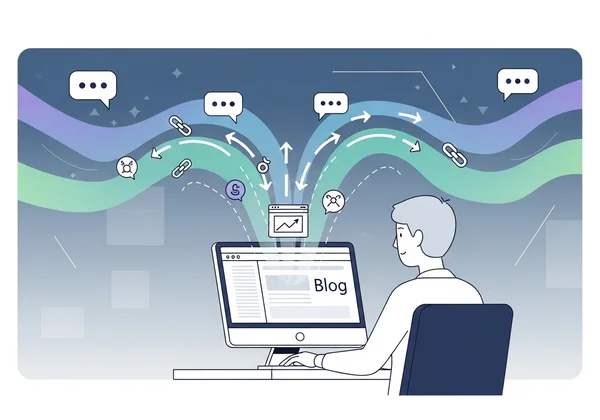
What are Blog Comment Backlinks and Why Do They Matter?
A blog comment backlink is simply a link to your website that you place in the comments section of a blog post. When you leave a comment, most forms allow you to add your name and a website URL. If your comment is approved, your name becomes a clickable link pointing back to your site.
While they may not carry the same weight as a link from a major news article, they play a crucial role in a well-rounded SEO strategy, especially for new websites. They help search engines discover your site and signal that you are an active participant in your industry's online community.
Understanding Nofollow vs. Dofollow Links for Comments
When discussing backlinks, you'll often hear the terms "dofollow" and "nofollow." Understanding them is key to setting the right expectations for blog commenting.
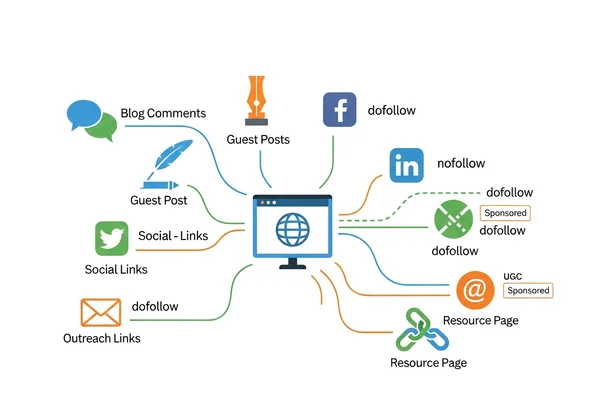
- Dofollow Links: These are standard links that pass SEO authority, or "link juice," from the linking website to your site. They act as a vote of confidence and have a direct impact on your search engine rankings.
- Nofollow Links: A
rel="nofollow"tag tells search engines not to pass any authority through the link. The vast majority of blog comment sections use nofollow links to prevent spam.
So, if most comment links are nofollow, why bother? Because they still offer significant SEO benefits. Google wants a natural mix of dofollow and nofollow links. Nofollow ones still send targeted traffic and build your brand.
The Key Benefits & Potential Risks of Blog Comment Backlinks
Like any SEO tactic, blog commenting has its pros and cons. A smart strategy maximizes the benefits while minimizing the risks.
Key Benefits:
- Easy to Acquire: It's one of the simplest ways for a new website to start earning backlinks.
- Builds a Diverse Link Profile: A healthy backlink profile includes various link types, and comments contribute to this diversity.
- Generates Referral Traffic: A thoughtful comment on a popular blog can send interested readers directly to your site.
- Increases Brand Awareness: Consistently leaving valuable comments on industry blogs establishes you as a voice in your niche.
Potential Risks:
- Can Be Seen as Spam: Leaving generic, low-value comments like "Great post!" will get your comment deleted and can harm your reputation.
- Low SEO Impact if Done Poorly: Links from irrelevant, low-quality blogs offer almost no value.
- Extremely Time-Consuming: Finding relevant blogs, reading posts, and crafting unique comments for each one is a manual, slow process.
The key is to focus on quality and relevance. And now, technology can help overcome the biggest hurdle: the time investment.
How to Find High-Authority Blogs for Relevant Backlinks
The success of your blog commenting strategy depends entirely on where you leave your comments. A single comment on a high-authority, niche-relevant blog is worth more than a hundred comments on random, low-quality sites. The goal is to find blogs where your target audience is already active.
Identifying Niche-Relevant Blogs for Your Audience
Before you look at any metrics, you must focus on relevance. A link is only valuable if it comes from a website related to your industry. For example, if you run a blog about vegan cooking, a backlink from a popular food blog is far more valuable than one from a blog about car repair.
You can find these blogs using simple Google search queries, often called "search operators." Try searching for phrases like:
"your keyword" + "blog""your keyword" + "leave a comment""your keyword" + "add comment"
Replace "your keyword" with topics from your industry. This will give you a starting list of potential blogs to explore.
Tools and Metrics for Vetting Blog Authority (DA/DR)
Once you have a list of relevant blogs, you need to check their authority. This helps you prioritize your efforts on sites that can provide the most value. SEOs use metrics like Domain Authority (DA) from Moz and Domain Rating (DR) from Ahrefs to estimate a website's strength.
These scores range from 0 to 100, with higher scores indicating a stronger site. While not official Google metrics, they are excellent indicators of a site's backlink profile and overall authority. You can use free tools like MozBar or the Ahrefs Website Authority Checker to quickly see the DA/DR of any site. As a general rule, try to comment on blogs with a higher DA/DR than your own website.
Automate Blog Comments SEO: Your AI-Powered Guide
Finding blogs and checking their authority is just the beginning. The real work is in reading each article and writing a comment that adds value. This is where most people give up due to the sheer amount of time it takes.
This is where AI automation changes the game. By using a tool designed for this purpose, you can streamline the entire process, from finding opportunities to submitting and tracking your comments. We've seen new sites gain over 50 approved comment backlinks in a week using this method. It eliminates the repetitive work so you can focus on quality engagement.
Step-by-Step: Installing and Configuring the GetBacklink.ai Plugin
Getting started with AI-powered blog commenting is incredibly simple. The GetBacklink.ai browser plugin is designed to make the process almost effortless.
- Visit the Website: Go to the official homepage and find the download link.
- Install the Plugin: Add the free extension to your Chrome or Edge browser in just one click.
- Configure Your Profile: Enter the name, email, and website URL you want to use for your comments. The plugin will securely save this information to automate form filling.
That's it. You're now ready to start building backlinks more efficiently.
Crafting Personalized Comments with AI for Maximum Impact
Automation risks spam. Smart AI avoids this. It won't spam "Nice article!"—it crafts thoughtful replies like your own assistant.
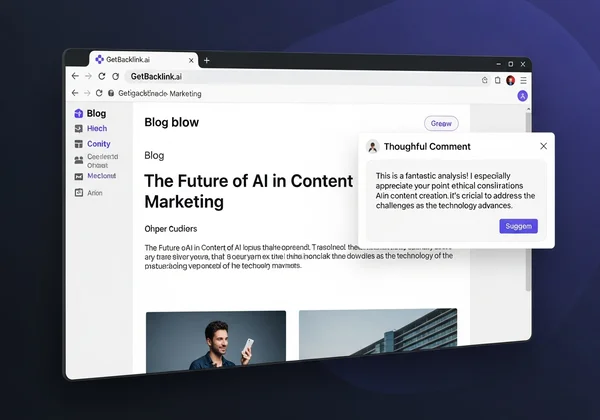
When you're on a blog post, our Get Backlink plugin allows you to generate a comment with one click. The AI reads and understands the context of the article and then suggests a relevant, personalized comment that adds to the conversation. You can use the suggestion as-is or edit it to add your own unique perspective before posting. This ensures your comments are always high-quality and valuable.
One-Click Submission & Tracking Your Backlinks with GetBacklink.ai
Once you have a comment you're happy with, the tool's true power shines. It automatically fills in your name, email, and website details into the comment form. All you have to do is click "submit."
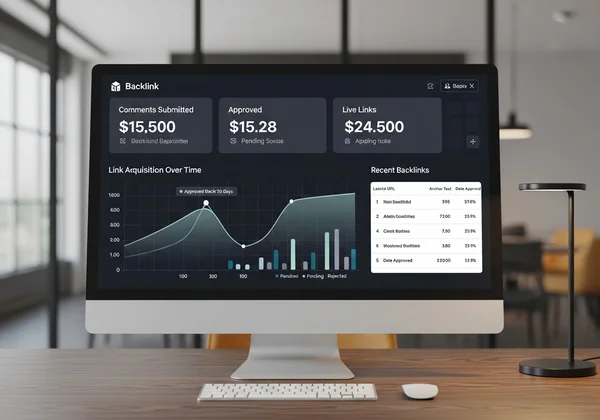
But it doesn't stop there. The platform also keeps a record of every comment you submit. You can easily track your progress and see which of your comments have been approved and are live. This feature turns a messy, hard-to-track process into an organized and measurable strategy.
Best Practices for Safe and Effective Blog Comment Backlinking
Automation makes the process faster, but it doesn't replace the need for a smart strategy. To get the best results and protect your site's reputation, always follow these best practices.
Avoiding Spam Tactics and Ensuring Genuine Engagement
Your goal is to be a welcome contributor, not a spammer. Follow these simple rules to ensure your comments are always well-received:
- Do: Always read the article (or use the AI summary) to understand the topic.
- Do: Aim to add value. Ask a question, offer a different perspective, or compliment a specific point the author made.
- Do: Use your real name or brand name, not a keyword-stuffed phrase like "Best Plumber NYC."
- Don't: Leave generic, one-word comments.
- Don't: Post comments on blogs that are completely unrelated to your niche.
- Don't: Include links directly in the body of your comment unless it's highly relevant and helpful. Use the dedicated website field instead.
Monitoring Your Comment Backlinks: Are They Live and Indexed?
Submitting a comment is only half the battle. You need to know if it gets approved. Manually checking dozens of blog posts every week is not a good use of your time.
This is another area where a dedicated tool is essential. The dashboard in GetBacklink.ai provides a clear overview of your submitted comments and their status. This helps you understand which blogs are approving your comments and lets you focus your efforts on sites where you are having the most success.
Boost Your SEO with Smart, Automated Blog Comments
Blog comment backlinks are a valuable and accessible strategy for any website owner looking to improve their SEO. While the manual process can be slow and tedious, AI-powered tools have revolutionized the approach.
By focusing on quality, providing genuine value, and leveraging automation to handle the repetitive tasks, you can build a strong foundation of backlinks that drives traffic and grows your brand's authority.
Tired of the manual grind? Download the free GetBacklink.ai plugin today and see backlinks roll in effortlessly.
Frequently Asked Questions About Blog Comment Backlinks
How can I get backlinks to my website for free?
Blog commenting is one of the most popular methods for getting backlinks for free. Other methods include creating valuable content that others want to link to, guest posting on other blogs, and submitting your site to reputable online directories. A tool like our Get Backlink AI helps automate the free commenting and directory submission processes.
Are blog comment backlinks still effective for SEO in 2024/2025?
Yes, they are still effective, but their role has evolved. They are best used to build a natural and diverse link profile, generate targeted referral traffic, and increase brand visibility. While they may not have the ranking power of a high-authority dofollow link, they are a vital part of a holistic SEO strategy.
How do I find high-authority blogs for comment backlinks?
You can find them by using targeted Google searches with keywords relevant to your niche. Once you find a potential blog, use free online tools to check its Domain Authority (DA) or Domain Rating (DR). Prioritize relevant blogs with scores higher than your own website's.
What are the risks of using automated tools for blog comments?
The main risk is producing low-quality, spammy comments that can get you banned from blogs and damage your brand's reputation. However, smart tools like GetBacklink.ai mitigate this risk by using advanced AI to generate personalized, context-aware comments that add real value to the discussion, ensuring you remain a welcome contributor.